![Weever2020-logo-with-padding.png]](https://support.weeverapps.com/hs-fs/hubfs/Weever2020-logo-with-padding.png?height=40&name=Weever2020-logo-with-padding.png)
Use this guide to learn what to do:
A. If you're working on the new form
B. If you're already using a form with the Action Item field
Action Tracker Overview
The new Action Tracker enhancement takes workflow management to the next level - ensuring every action moves swiftly to completion. Key details like assignees and action descriptions are now front and center, making it effortless to see ownership, context, and progress at a glance.
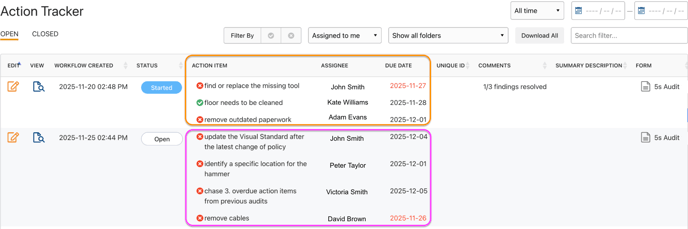
How do I achieve this?
A. If you're working on the new form
Make sure to use the Action Item field.
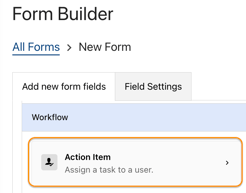
Action Item Field Overview
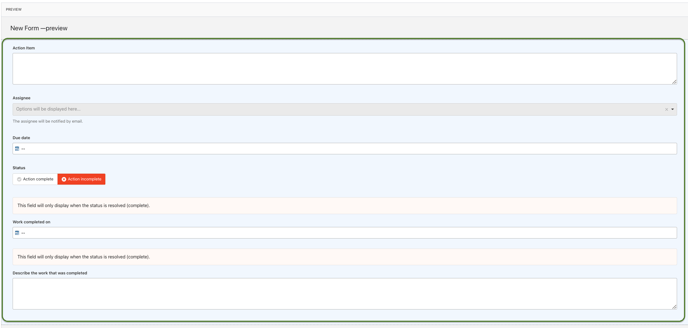
Enable the following fields:
- Action Item - Describes the work to be completed.
- Assignee - Allows you to assign a person to follow up. Don't forget to set who can assign people to their action items: Staff only, Administrators only, Administrators and Supervisors, or All user types.
- Status - Allows the assignee to set the current status of the issue.
- Due date - Allows you to specify a due date for each action item. Overdue action items will be displayed in red text in reports.
- Work completed on - Allows the assignee to enter the date the action item was resolved.
- Describe the work that was completed - Provides a detailed explanation of the work performed.
B. If you're already using a form with the Action Item field
Follow these steps to upgrade to the enhanced version:
- Duplicate the existing form
- Draft the old form
- Replace the old Action Item field with the new one in the duplicated version
- Re-schedule the form (if it’s an inspection)
- Connect both the old and new forms to Power BI (if you have a live Power BI dashboard connected to it).
Important: This preserves historical submissions while allowing future data to use the new Action Item field.