![Weever2020-logo-with-padding.png]](https://support.weeverapps.com/hs-fs/hubfs/Weever2020-logo-with-padding.png?height=40&name=Weever2020-logo-with-padding.png)
Background
Weever Process is a digital workflow management platform designed for manufacturing and production environments. It replaces paper-based quality checklists, logbooks, and sign-off sheets with a structured, guided digital system that your team follows on tablets or mobile devices.
Instead of handing someone a clipboard and hoping they follow the right steps in the right order, Weever Process gives every operator a clear, guided sequence of tasks to complete — and gives supervisors and managers real-time visibility into whether those tasks are being done on time.
It’s used most commonly for quality checks, production audits, compliance procedures, and any recurring operational process that requires a documented, auditable record — particularly in environments regulated by standards like FDA 21 CFR Part 11 or CFIA.
The Three Building Blocks
Weever Process is built around three core concepts. Understanding these makes everything else in the platform click into place.
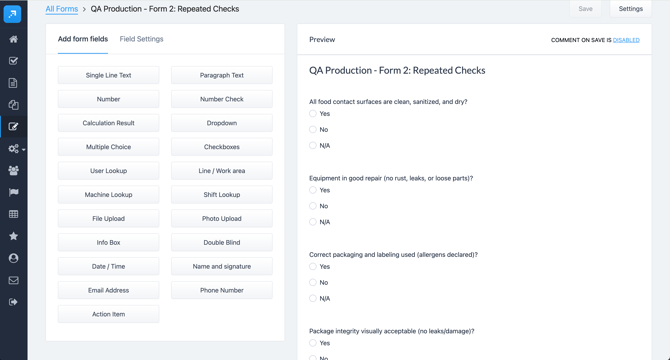
1. Forms — The data collection layer
Forms are digital versions of your paper checklists, log sheets, and sign-off sheets. They contain fields like temperatures, checkboxes, number readings, photos, and digital signatures. Forms are built in the Form Builder and used as the data-capture mechanism inside tasks.
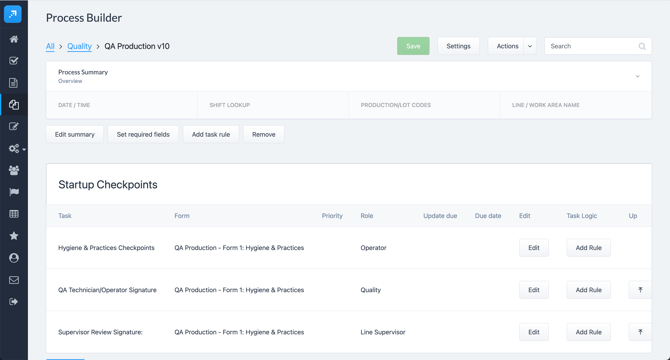
2. Process Templates — The workflow blueprint
A Process Template is a structured, repeatable workflow you build in the Process Builder. It defines the sequence of steps and tasks your team must complete, which forms to use, who is responsible for each task, and any conditional logic that controls when certain tasks apply. Think of it as the master recipe — it never changes, but it can be used over and over.
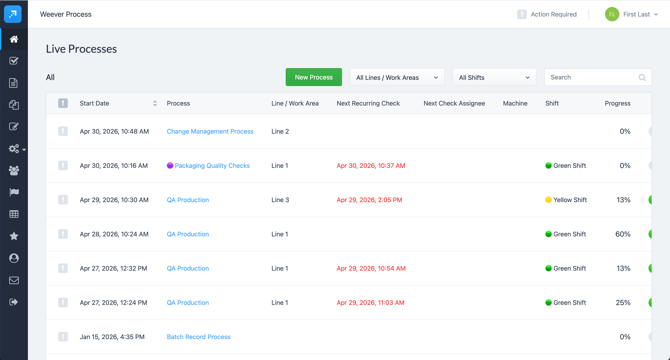
3. Live Processes — The active instance
When an operator starts a shift or production run, they launch a Process Template. This creates a Live Process — an active, real-time instance of the template that the team works through together. Every task completion, form submission, and digital signature is recorded, creating a complete, timestamped audit trail.
How It Works — A Typical Flow
- An Admin builds the forms and assembles them into a Process Template in the Process Builder.
- An Operator or Supervisor launches the template at the start of a shift from the Live Processes page.
- Operators receive task assignments based on their Job Role and are guided through each required action in sequence.
- As tasks are completed, supervisors see progress update in real time on their dashboard.
- If a task becomes overdue or an issue is flagged, a Process Alert is generated automatically.
- Once all tasks are complete, the process is closed and the record is stored permanently in Process Reports — ready for audits, reviews, or reporting.
Who Uses Weever Process?
|
Role |
What They Do in Weever Process |
|
Admin |
Builds and maintains Process Templates, manages users and job roles, configures settings |
|
Supervisor / Manager |
Monitors Live Processes in real time, reviews Process Alerts, closes completed processes |
|
Operator / Quality Tech |
Completes assigned tasks, fills in forms, submits readings and signatures during their shift |
And That’s It!
Now that you understand the basics — forms capture data, templates define the workflow, and live processes are where the work actually happens — you’re ready to explore how to set up and use Weever Process for your team.